
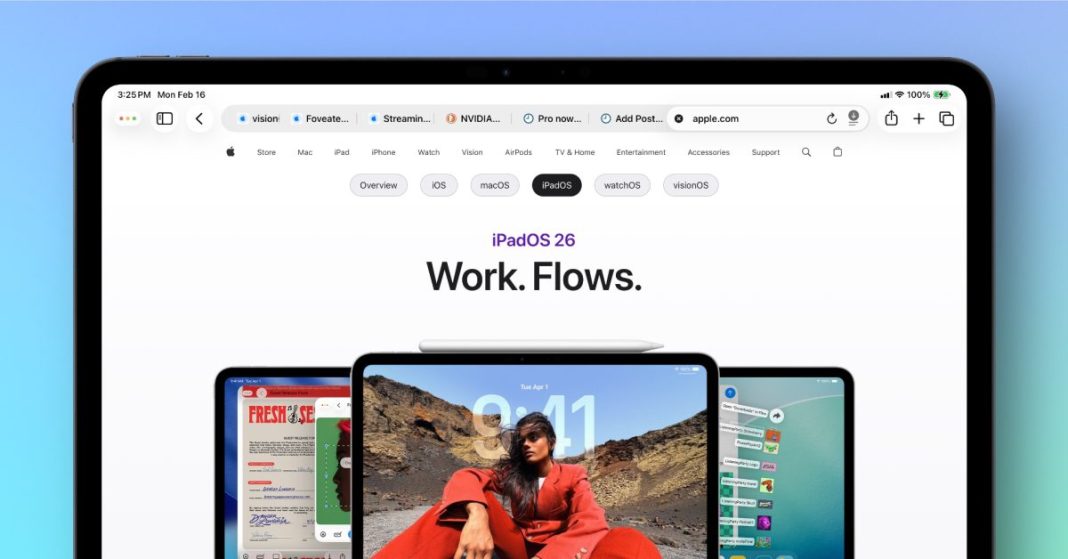
Ever felt like your browser was hogging just a bit too much screen real estate? Like every pixel was precious, especially when you’re deep into research or enjoying some streaming? Well, get ready for a breath of fresh digital air, because Safari on macOS Tahoe 26.4 and iPadOS 26.4 is rolling out a feature that’s all about giving you back control: a beautifully compact tab bar.
Reclaiming Your Digital Real Estate
For years, web browsers have walked a tightrope between functionality and minimalism. We need our tabs, our search bar, our extensions – but at what cost to the precious content area? Safari’s new compact tab bar is a masterclass in elegant problem-solving. Gone is the slightly chunky presence that ate into your viewing space. In its place is a streamlined, intelligent strip that shrinks its visual footprint without sacrificing usability.
This isn’t just about saving a few pixels; it’s about shifting the focus back to what you’re viewing. Imagine those sprawling articles, immersive videos, or detailed spreadsheets now having just a little more room to breathe. The difference might seem subtle at first, but over hours of browsing, it accumulates into a significantly less cluttered and more focused experience. It’s a quiet but powerful statement: your content comes first.
Enhanced Focus, Effortless Navigation Across Your Devices
The compact tab bar isn’t just a visual shrinking; it’s a recalibration of your entire browsing rhythm. On macOS, this means less visual distraction, allowing your eyes to naturally settle on the rich content of the web. It integrates more seamlessly with macOS’s overall aesthetic, fostering a more unified and calm digital workspace. You still have full access to all your open tabs, the search bar, and your favorite extensions – they’re just presented with a new level of sophistication and economy. It makes your Mac feel even more expansive.
For iPadOS users, the gains are perhaps even more pronounced. The iPad often serves as a primary computing device, and every pixel matters for productivity, entertainment, and creativity. Imagine sketching in an art app with Safari open for reference, or deeply engaging with an interactive article; the compact tab bar ensures Safari is a powerful tool without being an imposing presence. It respects your screen, empowering you to do more without feeling constrained. As one long-time web designer, Sarah Chen, put it, “It’s those small, thoughtful design tweaks that truly elevate the daily experience, especially when they empower users to focus on content, not chrome.”
This thoughtful design choice truly shines in a multitasking scenario, enabling you to snap Safari next to another app and still enjoy a generous view of your web content, making your iPad an even more potent productivity machine.
This latest refinement to Safari’s interface is more than just a cosmetic change; it’s a testament to Apple’s ongoing commitment to optimizing the user experience. By making the tab bar more compact, Safari isn’t just saving space; it’s enhancing focus, promoting efficiency, and ultimately, making the act of browsing the web a more pleasant and productive journey. Get ready to rediscover your favorite websites with a newfound sense of spaciousness and clarity.